
Should I Run Two Antivirus Programs at Once?
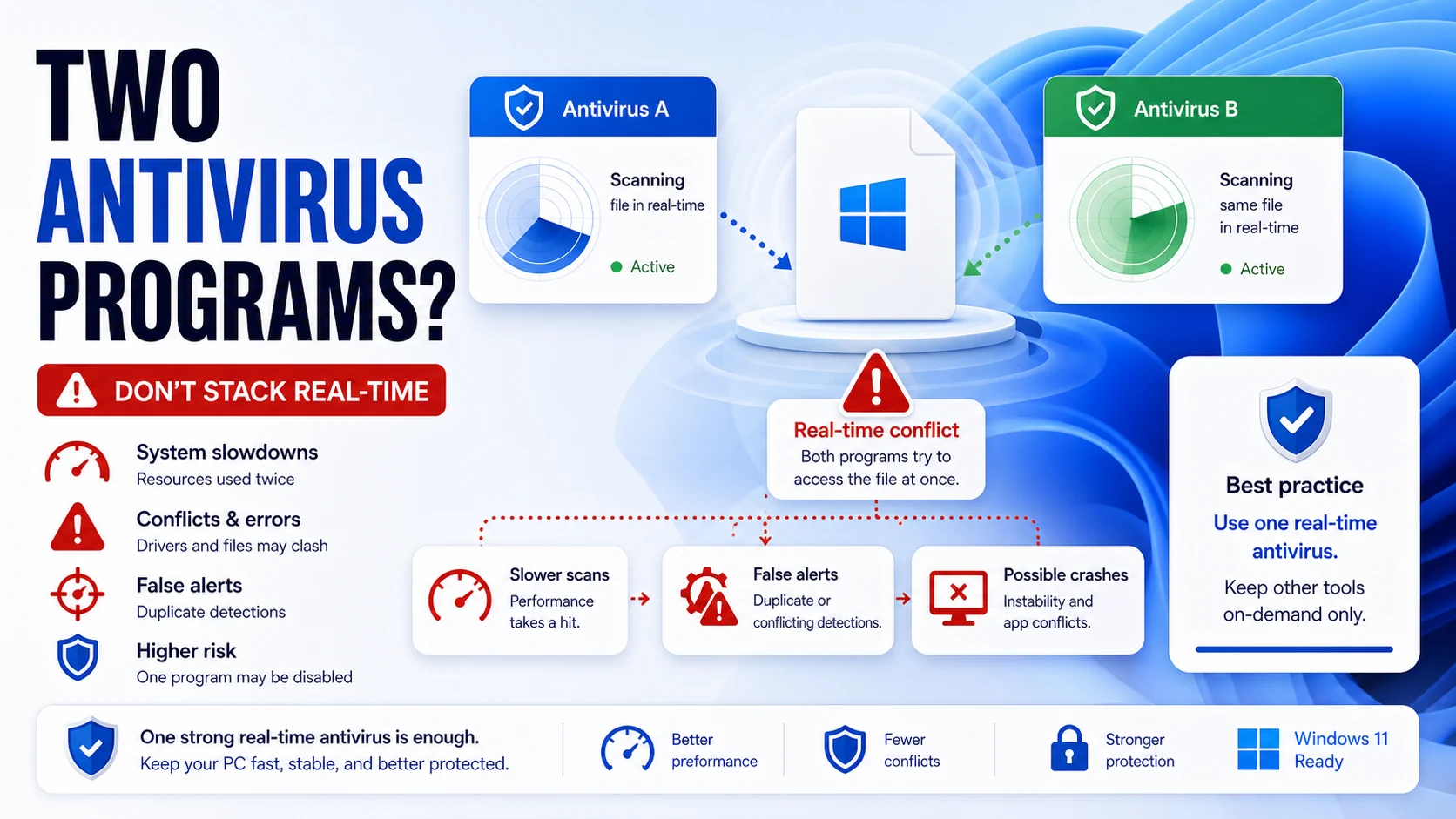
Pairing two real-time antivirus engines feels like double protection. It almost never is. Below is what actually happens at the kernel level when two scanners fight for the same file, why Microsoft Defender behaves differently from every other AV on Windows 11, and the narrow set of cases where layering a second tool genuinely helps.
The Short Answer
No — running two real-time antivirus engines on the same Windows 11 machine causes more harm than good. Both products fight for the same file-system hooks, scan the same files twice, and frequently flag each other as suspicious. Detection rates between top-tier products differ by roughly 1–2 percentage points in independent testing (AV-Comparatives, Feb–Mar 2026), so the marginal coverage gain doesn't come close to offsetting the slowdowns and false positives.
TL;DR: Run one real-time antivirus. If you want a second opinion, install an on-demand scanner like Malwarebytes Free or Emsisoft Emergency Kit and run it manually.
What Actually Breaks When Two Real-Time Scanners Run Together
Real-time antivirus is not a regular application. It registers a mini-filter driver with the Windows kernel so it can intercept every file open, write, and execute before the operating system completes the call. AV-Comparatives describes the failure mode bluntly in their editorial on multiple antivirus programs: when two such drivers both try to mediate the same I/O, the system has to either pick one to win the race (rendering the loser useless) or freeze.

Three concrete failure modes show up over and over in support forums and on threads on r/antivirus and r/techsupport:
- The temp-file scan loop. Symantec and AV-Comparatives both document the same scenario: AV-A copies a file to its temp folder to scan it. AV-B sees a new file appear, copies it for its own scan. AV-A sees AV-B's copy, scans that. The loop continues until RAM exhausts. Modern engines mostly engineered around this after 2017 (per Emsisoft), but it still surfaces on poorly-tuned pairs and after Windows feature updates reset exclusion lists.
- Mutual quarantine. Antivirus software, by design, does things malware does — kernel hooks, file modification, process injection. Pair Kaspersky with another behavior-monitoring engine and one will sooner or later flag the other's update service as suspicious. We've watched a Bitdefender behavioral module quarantine a competing AV's signature-update binary mid-download — the competing AV then re-downloaded, got quarantined again, and eventually failed open with no current signatures.
- RAM and CPU bloat. Emsisoft's analysis pegs the cost of running two full real-time stacks at roughly half a gigabyte to a full gigabyte of additional RAM, plus duplicate scan I/O on every file touch. On a fanless laptop, this turns a five-minute boot into a fifteen-minute one and burns through battery doing redundant work.
If you want to understand how heavy a single modern engine already is on day-to-day performance, our Bitdefender review and Norton antivirus review include the per-product CPU and RAM observations from our 2026 hands-on testing rig.
The Microsoft Defender Exception in Windows 11
Microsoft Defender is the one Windows AV that knows about other AVs and gets out of the way. Microsoft's compatibility documentation (last updated April 21, 2026) spells out the behavior clearly: when a non-Microsoft antivirus registers itself with the Windows Security Center service, Defender automatically transitions out of active mode. On consumer Windows 10 and 11 installs, that means Defender goes into Disabled state — not paused, not passive, fully stood down.
Two Windows 11 24H2 wrinkles are worth knowing:
- Smart App Control changes the outcome. If SAC is on (the default on clean Windows 11 24H2 installs that meet the trustworthiness criteria), Defender drops into Passive mode instead of Disabled when a third-party AV is registered. Passive mode means Defender's engine is loaded and receiving signature updates, but it doesn't scan in real time and doesn't remediate threats.
- Tamper Protection is on by default and will reverse manual attempts to flip Defender's state. If you uninstall a paid AV and Defender doesn't immediately reactivate, that's normal — the Windows Security Center service re-enables it on the next service tick, not the moment uninstall completes.
Microsoft also offers Limited Periodic Scanning, which is what most readers are actually asking for when they ask whether they can run Defender alongside Norton or Bitdefender. The setting lives under Windows Security → Virus & threat protection → Microsoft Defender Antivirus options, and it's only visible when a third-party AV with active real-time protection is installed. Microsoft's own docs flag the catch: LPS uses "a limited subset of the Microsoft Defender Antivirus capabilities" and "can't detect most malware and potentially unwanted software." It's a backstop, not a second engine. For a fuller breakdown of where Defender stands on its own, see our pillar article on whether Windows Defender is good.
The Safe Exception: On-Demand Scanners Alongside a Real-Time Engine
A real-time engine watches every file event continuously. An on-demand scanner only runs when you tell it to — it has no kernel-level driver hooked into the I/O path, so it doesn't compete with your primary AV for file handles. This is the one configuration where layering genuinely helps.
What qualifies as a true on-demand scanner:
- No background real-time service. When the app is closed, nothing of it is running.
- No registration with Windows Security Center. Your primary AV stays in active mode.
- Manual or scheduled trigger only. You launch a scan; it scans; it exits.
Two products fit cleanly in 2026:
- Malwarebytes Free — the paid Premium edition includes real-time protection and would conflict; the Free edition runs on demand only. Threads on r/antivirus consistently report the Free edition as the most popular second-opinion tool because it ships its own browser-extension-style URL block list as well.
- Emsisoft Emergency Kit — portable, runs from a USB stick, dual-engine (Bitdefender's signatures plus Emsisoft's own behavior heuristics), and never installs a service. Useful when you suspect a real-time AV has been compromised by malware already on the box. Our Emsisoft Emergency Kit review walks through the actual scan workflow.
You can read more about second-opinion scanners and remediation tools in our best malware removal guide and our Malwarebytes AdwCleaner review.
The Pairs That Work Without Conflict
These combinations are safe in 2026 because the second tool has no resident driver:
| Primary (real-time) | Second-opinion (on-demand) | Why it works |
|---|---|---|
| Microsoft Defender | Malwarebytes Free | Different signature corpus; MWB Free has no real-time service. |
| Bitdefender Total Security | Emsisoft Emergency Kit | Portable, no install, runs only when launched. |
| ESET HOME Security | HitmanPro | HitmanPro 30-day trial scans on demand only; pairs cleanly. |
| Norton 360 | Microsoft Safety Scanner | Microsoft's own portable scanner; expires after 10 days, redownload as needed. |
| Avast Free / AVG Free | Malwarebytes Free | Same engine family for primary; MWB adds independent detection. |
For our 2026 picks among the real-time engines themselves, see our best free antivirus software roundup and the Windows Defender review.
Microsoft Defender (always on, ships with Windows 11) + Malwarebytes Free (manual scan once a week). No license cost, no renewal calendar to track, no kernel-driver conflicts. Defender carries the perfect 18/18 score from AV-TEST February 2026 in real-time mode; Malwarebytes Free catches the PUPs, adware, and stealers that signature-based engines occasionally miss, with no resident service to fight Defender for file-system hooks.
If you prefer a paid primary: swap Defender for Bitdefender Total Security, Norton 360, or ESET HOME Security Premium; keep Malwarebytes Free as the second-opinion tool. Same logic, same conflict-free pairing rules.
What to skip: two paid AVs at once. Two real-time engines. Malwarebytes Premium alongside any third-party real-time AV. Limited Periodic Scanning as your only second-opinion tool (Microsoft's docs flag it as too narrow to detect most malware on its own).
What AV-TEST and AV-Comparatives Say
Both labs treat single-engine deployments as the baseline. AV-TEST's January–February 2026 home-user cycle evaluated 16 Windows 11 products with each running solo at default settings; max score is 18 points across protection, performance, and usability, with the "TOP PRODUCT" badge issued at 17.5 or higher. None of the lab's methodology accommodates double-installs because the labs treat that configuration as out-of-spec.
AV-Comparatives' own consumer editorial — the most-cited authority on this question — is unambiguous: the headline of their piece is literally "Why you should never have multiple antivirus programs on your computer." Their February–March 2026 Real-World Protection Test ran 20 consumer products against 200 live malicious URLs, and across the top tier the protection-rate spread is narrow enough that no realistic stacking of two engines moves the dial in a way that justifies the conflict cost. Pick one product that scored well; that's the entire optimization.
How to Safely Uninstall a Previous AV Before Installing a New One
Standard Windows Add/Remove Programs is not enough. Norton, McAfee, Kaspersky, and ESET all install kernel-mode mini-filter drivers, browser extensions, password manager add-ons, and scheduled tasks that the standard uninstaller misses. Leftover drivers are the single most common cause of "I uninstalled my old AV and the new one won't install" support tickets.
Use the vendor's dedicated removal tool:
| Vendor | Tool | Notes |
|---|---|---|
| Norton | Norton Remove and Reinstall tool | Internet required (downloads current removal definitions). |
| McAfee | MCPR (McAfee Consumer Product Removal Tool) | Run in Safe Mode for cleanest removal; current version 10.5.374.0. |
| Kaspersky | kavremover (KAVRemoverTool) | Requires Safe Mode if Kaspersky's self-defense was on. |
| ESET | ESET Uninstaller | Run in Safe Mode; deletes all installed ESET products at once. |
| Avast / AVG | Avast Clear / AVG Clear | One tool per product; Safe Mode recommended. |
| Bitdefender | Bitdefender Uninstall Tool (per product line) | Different binary for Total Security vs. Internet Security vs. Antivirus Plus. |
The clean order is: 1) run the vendor uninstaller in Safe Mode, 2) reboot, 3) confirm no AV processes are running in Task Manager, 4) confirm Windows Security shows Defender as active or shows the freshly-installed AV as the registered provider, 5) only then run a full scan.
Frequently Asked Questions
Can I install two antivirus programs but only run one at a time?
You can install both, but real-time drivers load at boot whether you've opened the app or not. Disabling real-time protection inside one product's UI doesn't always unload its kernel driver. Practical answer: no, install one, and use the other as an on-demand scanner only.
Does Microsoft Defender count as a second antivirus if I install Norton?
Not in the way that causes conflicts. Defender automatically transitions to Disabled state (or Passive, on Windows 11 24H2 with Smart App Control on) the moment Norton registers with Windows Security Center. You're running one real-time engine — Norton — with Defender held in reserve.
Is Malwarebytes Free safe to run alongside Bitdefender?
Yes. The Free edition is an on-demand scanner with no real-time service. The Premium edition includes real-time protection and would conflict with Bitdefender's behavioral module — install Free, not Premium, when pairing.
Will running two AVs make my PC twice as protected?
No. Independent testing shows the protection-rate spread between top-tier real-time products is roughly 1–2 percentage points. Two engines fighting for the same hooks frequently end up less effective than either alone, because one driver wins the race and the other sits idle. You also pay double the RAM cost and duplicate scan I/O.
What is Limited Periodic Scanning and should I turn it on?
It's a Defender feature that runs scheduled scans even when a third-party AV is your primary. Microsoft's documentation states it uses only a limited subset of Defender's capabilities and can't detect most malware on its own. Treat it as a low-cost backstop for once-a-week peace of mind, not as second-opinion protection.
My new AV won't install because the old one is "still detected" — what now?
Run the previous vendor's dedicated removal tool from Safe Mode, reboot, then retry. Vendor uninstall tools clean up the kernel drivers and registry entries that Add/Remove Programs leaves behind.
Verdict
One real-time antivirus, plus on-demand scanners run manually when something looks off. That's the configuration that actually works in 2026. Defender plus Malwarebytes Free is the no-cost default for most home users; if you want a paid primary, pair Bitdefender, ESET, or Norton with the same Malwarebytes Free as your second-opinion tool. For more on whether Defender alone is enough, see our cluster pillar on whether Windows Defender is good.
BIS Kaspersky availability note: Kaspersky examples in this article are technical/contextual, not a fresh U.S. purchase recommendation. U.S. readers should check the Bureau of Industry and Security Kaspersky determination before buying, renewing, or installing Kaspersky-branded cybersecurity software.